
Find any file on your computer, as fast as you can type.
QuickSearch helps you find important files quickly and easily. It indexes the folders you choose, names and text contents, and shows ranked results with every keystroke. It's free, open source, and yours to keep.
Free software under the GPL · no account, no telemetry, nothing to buy · or build it yourself
What it does
Results while you type
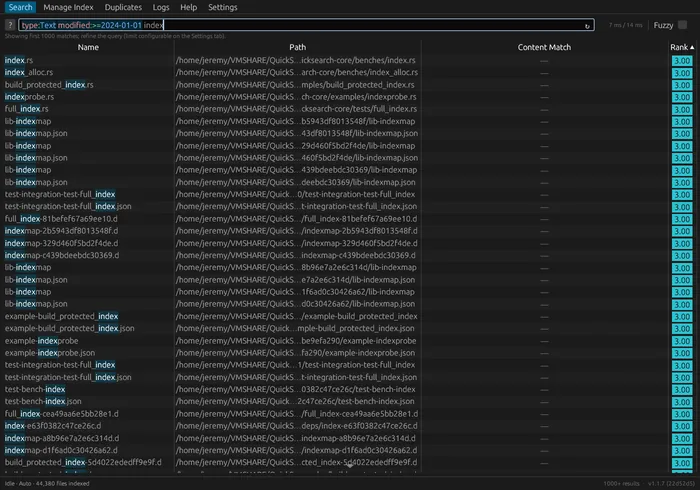
Every keystroke cancels the previous search and starts a new one. When combined with a lightning fast search engine, you know if you have the results you want before you even finish typing.
Searches inside files
Plain text, PDFs, Office documents, even audio tags and photo EXIF data. Matches show highlighted snippets so you can tell it's the right file before opening it.
Stays fresh on its own
Filesystem watchers pick up new and changed files as they happen, with periodic reindexing as a safety net. You never have to think about the index.
Forgives typeos
One checkbox turns on fuzzy matching. Typing repot still finds your reports. Exact matches and same-capitalization always rank first.
Private by design
Everything stays on your machine. Optionally encrypt the index with a password, so even the search database is protected if someone gets a copy.
Terminal, too
The same search works from the command line: quicksearch "quarterly budget" prints ranked paths, ready for pipes and scripts.
Quickstart
Only three steps to start searching. You can probably do all three in less than 60 seconds.
Install and open
Grab a download above, or build from source. On first run QuickSearch creates its config and suggests your home folder as the place to index.
Indexing takes only seconds for most people
The bottom bar shows indexing status. You can search while it works; results just get more complete as it goes.
Just type
Double-click a result to open it; right-click to reveal it in your file manager or copy its path. Sort results by rank, name, path, size, or modified date.
Search syntax
Plain words search names, contents, and paths. Add filters when you want to narrow down. Try editing the interactive query below, it highlights the same way the app does.
budget report
names, contents, and paths containing the phrase
"exact phrase"
quotes keep spaces, stars, and filter-like words literal
bud*port
* matches any run of characters
type:Audio
Audio, Image, Video, Document, Text, Archive, Spreadsheet, Presentation, Folder
modified:>=2024-01-01
also <, <=, >, = dates are yyyy-mm-dd
path:/home/me/docs
restrict to a folder and its subfolders
name:re*.txt
filename contains; unquoted * globs
mime:application/pdf
exact MIME type
regex:"(foo|bar)\d+"
regular-expression search, combinable with filters
quicksearch --fuzzy repot
the same searches work from the terminal
Half-typed quotes never error, unknown key:value text (like 12:30) is just searched as words, and exact matches always rank above fuzzy ones. The in-app ? popup has the same cheatsheet.
Under the hood
QuickSearch is built to be lightning fast by being simple. It's plain Rust, uses ordinary threads and channels, no async runtime, no background services. One SQLite file holds the whole index.
Speed isn't one clever trick, it's syscall-level optimization, memory churn and RSS benchmarks, and hot-path micro-optimizations. We also never block on a lock, never re-read what hasn't changed, and never sit idle waiting for a disk.
Typing never waits
Every search gets a number. The next keystroke bumps it, and the running scan notices between rows and drops everything it was doing. If it's already blocked deep inside the database, it gets interrupted mid-statement instead of being waited out. The interrupt carries the number it was meant for, so a cancellation can never land on the search you just started.
Results arrive mid-scan
The first batch of matches reaches the window the moment it exists, and more follow on a fixed clock while the scan is still running. The list keeps itself sorted as better matches land, so nothing is held back waiting for a search to finish.
Eleven tiers, ranked in Rust
Exact filename, then filename substring, then contents by how often the phrase appears, then path, then near misses. The database is never asked to sort or score anything: each tier is one scan, classified in Rust as rows arrive. Once the visible list is full, the weaker tiers are skipped outright rather than computed and thrown away.
Trigrams narrow, proof decides
The full-text index is built on three-character fragments, so a piece from the middle of a word is an index lookup rather than a scan. Fragments only shortlist, though. Every candidate is checked against the real text before you see it, so the index gets to be fast without ever being trusted.
Nothing waits on the disk
Listing folders, pulling text out of files, and writing to the database each run on their own threads, joined by fixed-size queues. While one thread is parked waiting for the disk, another is hashing or compressing. The queues also push back: if writing falls behind, reading slows down to match instead of memory quietly growing.
One syscall for a file that hasn't changed
Re-checking a folder that hasn't moved costs a single metadata call per file and opens nothing at all. Directory listings already say which entries are folders, so the system is never asked twice. When a file really has changed, it's opened once, and that one read feeds the fingerprint, the file-type sniff, and, if the file is small enough, its text.
A pipeline per folder, tuned to the drive
Every folder you index gets its own walkers and its own extraction workers, all running at the same time, so a slow network share can't stall a local drive. Network paths are recognized as such and handed far more workers, because there the wait is round trips rather than the disk itself.
Watches, doesn't poll
Native filesystem notifications on Linux and Windows update single files the moment they change. Bursts collapse so a noisy folder can't flood the queue, and deleting a large folder collapses to one range delete instead of thousands of individual ones. A periodic full pass exists purely as a safety net, never as the mechanism.
Readers and writers never queue
Every write funnels through a single thread, so the database never contends with itself. Each search opens its own read-only connection and reads a consistent snapshot through the write-ahead log. Connections skip SQLite's internal locking entirely, because Rust already guarantees one thread per connection. Long write jobs are cut into slices, so a search never sits behind one.
One compact file
The whole index is a single SQLite database. The full-text index keeps only the structure needed to search, not a second copy of your documents, and the extracted text sits beside it zstd-compressed. It checkpoints as it grows, and compacts itself after a run when there's enough slack to be worth the work.
Fingerprints from a fixed-size read
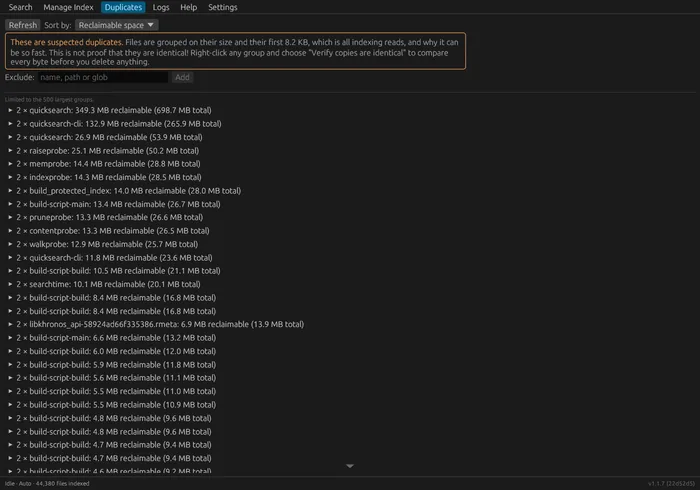
Duplicate detection hashes the size plus a bounded head of each file, through your CPU's dedicated hashing instructions, so the cost doesn't grow with file length. Deciding what needs re-indexing doesn't hash at all: it compares timestamps, which is why an unchanged file is never opened.
Nothing leaves your machine
No network access, no accounts, no telemetry. Turn on password protection and the index file itself is encrypted, with the key stretched once from your password by a deliberately slow, memory-hard function. The password is wiped from memory straight afterwards, and only the derived key is kept.
Build it yourself
You don't have to take our word for what's in the download. The whole thing is GPL-licensed source, and one script takes a fresh machine to a running app. The script installs missing build dependencies, compiles a release build, and launches the GUI.
cd quick_search
On Debian or Ubuntu, ./packaging/build-deb.sh assembles a proper .deb, including menu entry, icons, man pages, and makes uninstalling easy with apt remove. On any other distribution, ./packaging/build-appimage.sh produces a single self-contained .AppImage that needs no installation at all. Details in the README.
A pet project that grew up
QuickSearch started as a Covid-era pet project, working reliably for me for several years, and slowly improved. Eventually it was rewritten with a better interface so that anyone could use it, not just the person who wrote it.
It's shared in that spirit: free, open, and hopefully useful. If it saves you some time, that's the whole point. And if you ever feel like saying thanks, there's a little ♥ in the corner.